A calmer shared calendar for close groups.

Cotempo gives households, partners, and small trusted groups one private place to plan together.

Our Household June 2026 Today SunMonTueWedThuFriSat 31 1 2 3 4 5 6 7 8 9 10 12 13 14 15 16 17 18 20 21 22 23 24 25 26 27 28 29 30 1 2 3 4 11 19 Friday, June 19 Trash night All day LR MV Dinner with Sam 7:30 PM MV Soccer practice 4:00 PM - 5:30 PM LR Add event
See how it works
Scroll
How it works

Watch a shared calendar come together.

Create one private calendar, invite the right people, add the plan, and let reminders handle the follow-up — all in a single quiet place.

Why Cotempo

The shared calendar is the product.

Plans get lost between the wall calendar and the group chat. Cotempo keeps each one in a single calm place — no feed to scroll, nothing competing for the plan.

Plans don’t get buried

Dates, times, colors, and assignees stay attached to the event instead of scrolling away in a thread.

Built for focus, not feeds

The current Android release has no ads, no third-party analytics SDK, and no algorithmic timeline. Just the shared schedule.

Works offline

View, create, and edit plans with no signal. Changes wait on your device and sync when the connection returns.

Focused on shared time

No chores module, shopping list, GPS, or public profiles. Cotempo stays out of the way of everything else.

A look inside

A clean rhythm for everyday plans.

Real Android captures from the app, using a sample private household calendar.

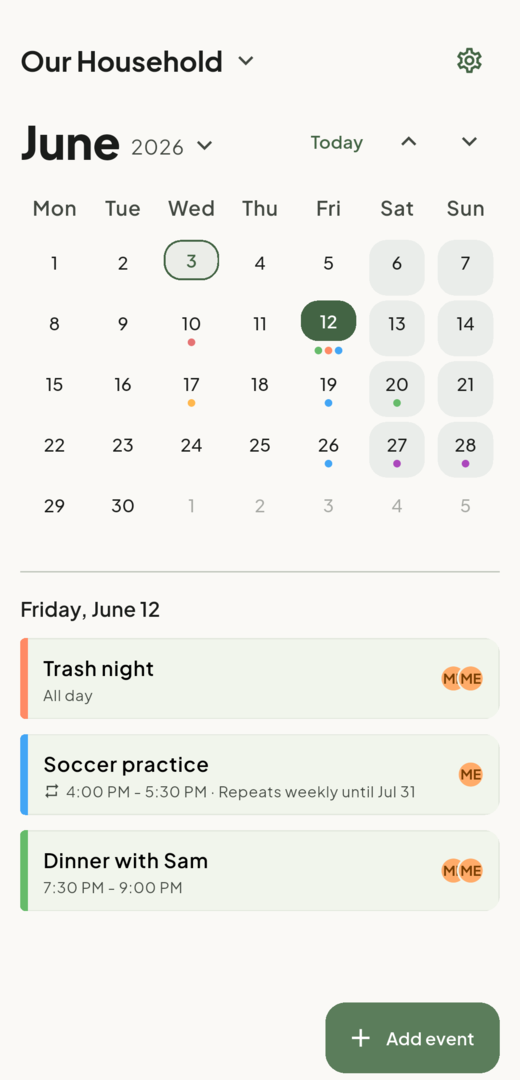
Cotempo month view showing a June calendar with selected day, event color dots, and shared agenda items.
Month at a glanceToday, selections, and event color dots.
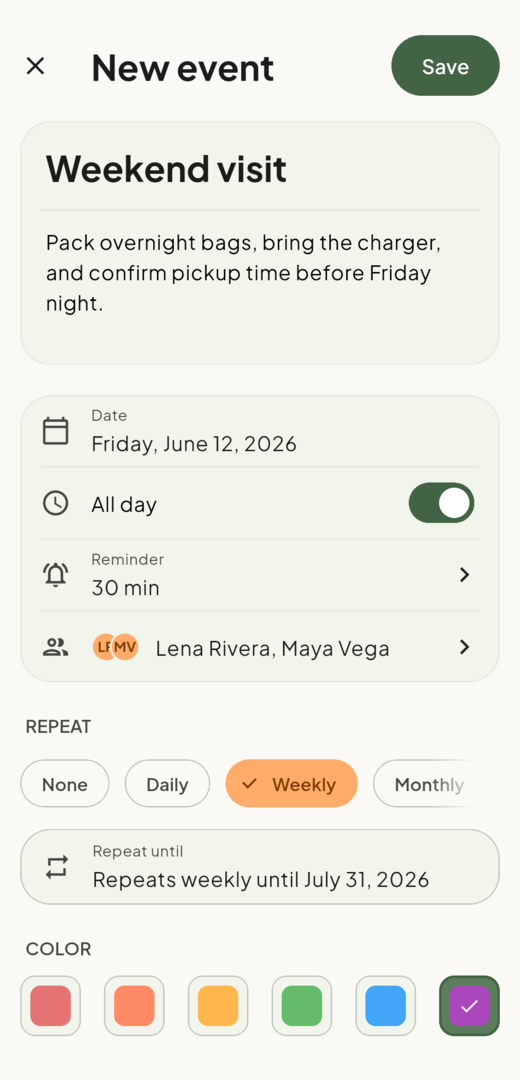
Cotempo event creation screen showing title, description, all-day setting, reminder, assignees, weekly repeat, and color choice.
Complete event setupReminders, repeats, colors, and who is assigned.
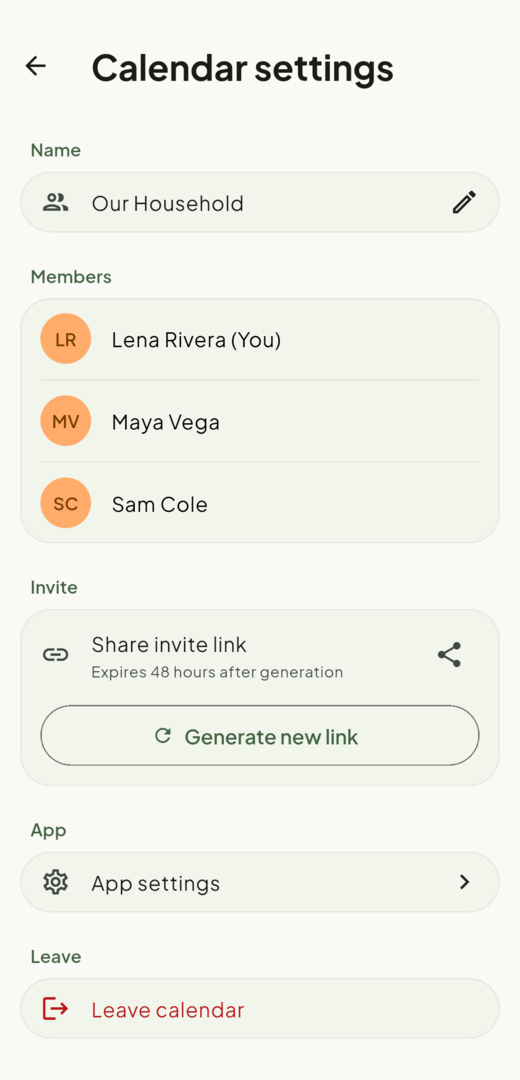
Cotempo calendar settings screen showing members and a private invite link that expires after 48 hours.
Invite by linkOne private link, 48-hour expiry.
Privacy first

Private enough for everyday plans.

Cotempo does not need a social graph to help a small group coordinate.

  • No third-party analytics SDK. Your taps are not sold to a tracking network.
  • No GPS, contacts import, or device-calendar import. You invite people by link.
  • Delete your account anytime. In the app after re-entering your password, or by email if you’ve uninstalled.
Questions

Straight answers.

Is Cotempo on iPhone or the web?
Not yet. Cotempo is Android only (Android 8.0 and up). There is no iOS app and no web version today.
How do I delete my account?
Open App Settings in Cotempo, choose Delete account, and re-enter your password. If you no longer have the app installed, email deletion@homeleafstudio.app. See the account deletion page for full details.
What happens to shared events if I leave or delete my account?
Events stay available to remaining members because they belong to the group. Your name is replaced with "Deleted user" in event attribution, and you are removed from assignees.
Does it work offline?
Yes. You can view your calendar and create or edit events with no connection. Changes are stored on your device and sync automatically when you are back online.
Does Cotempo sync with Google Calendar or Outlook?
No. Cotempo is a self-contained shared calendar and does not connect to Google Calendar, Outlook, Apple Calendar, or your device calendar.

Plan together, without the noise.

Cotempo is heading to Google Play. The download link will appear here when the listing goes live.

Contact support